

From my observation, i found that there are some student did not understand the Cisco CLI command hierarchy. Means that you don't understand the flow of Cisco IOS command.
Please understand this hierarchy and i will randomly pick any student and present it in the class.
Please read the full explanation of Cisco IOS Command hoerarchy from this site: http://www.cisco.com/warp/cpropub/45/tutorial.htm
p/s:Please put it on your lecture note + Copy the Cisco Command Summary from this site: http://networking.ringofsaturn.com/Cisco/ciscocommandguide.php
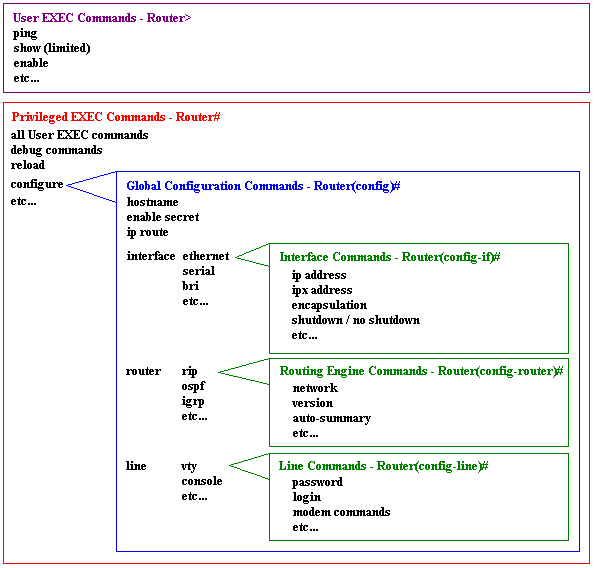
To assist users in navigation through IOS CLI, the command prompt will change to reflect the position of a user within the command hierarchy. This allows users to easily identify where within the command structure they are at any given moment. Table 2 is a summary of command prompts and the corresponding location within the command structure.
Table 2 - IOS Command Prompt Summary
- Router> - User EXEC mode
- Router# - Privileged EXEC mode
- Router(config)# - Configuration mode (notice the # sign indicates this is only accessible at privileged EXEC mode.)
- Router(config-if)# - Interface level within configuration mode.
- Router(config-router)# - Routing engine level within configuration mode.
- Router(config-line)# - Line level (vty, tty, async) within configuration mode.

No comments:
Post a Comment